Domain Reload Auditor
Every domain reload runs every [InitializeOnLoad] type and [InitializeOnLoadMethod] method in the project. This tool lists all of them, grouped by the package that shipped them, and tracks whether the list and the reload are growing.
$29one-time · Unity Editor tool · ZIP (34 KB)
Buy with card
The download link appears right after payment, and a license key is emailed to you.
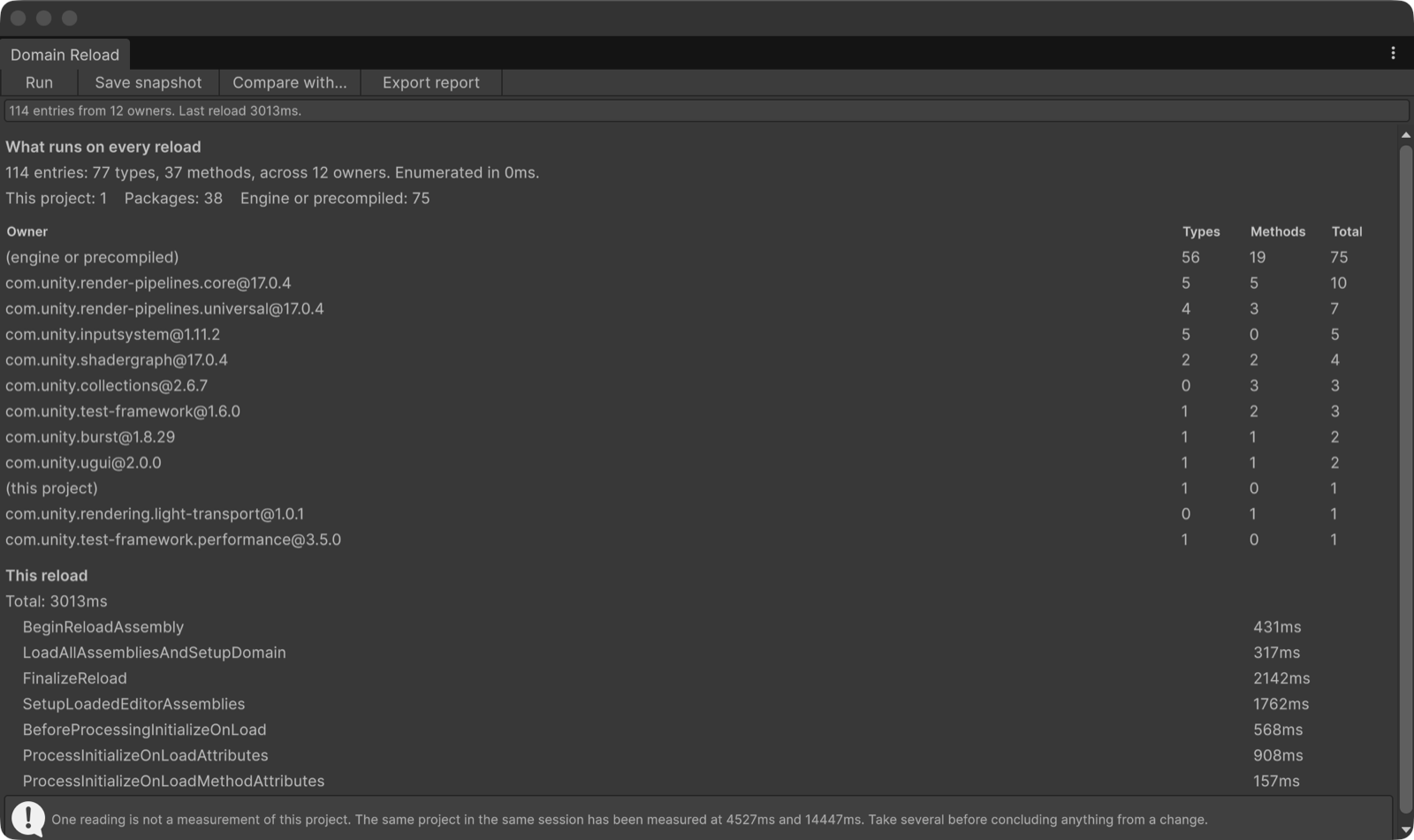
What it reports
- Every
[InitializeOnLoad]type and[InitializeOnLoadMethod]method, grouped by owner (each package, your project, or the engine and precompiled assemblies). Attribution is exact, read live through TypeCache. The table lists every owner, not the first few. - The reload phases, from the Domain Reload Profiling block Unity writes to the Editor log. A phase missing from a log is reported as not measured, never as zero.
- A comparison with a saved snapshot: total, tracked phases, and which owners' counts changed.
- A CI gate with a reload ceiling and a growth limit, exit code 2 when exceeded. A check that could not run exits 5 instead of 0, so a gate never reports success while enforcing nothing.
What it does not claim. It does not tell you how many milliseconds each type or method costs.
Unity does not expose that, and timing them from outside the reload would measure something else. It tells you
exactly what runs and whose it is, and how the whole reload moved.
Measured, not claimed
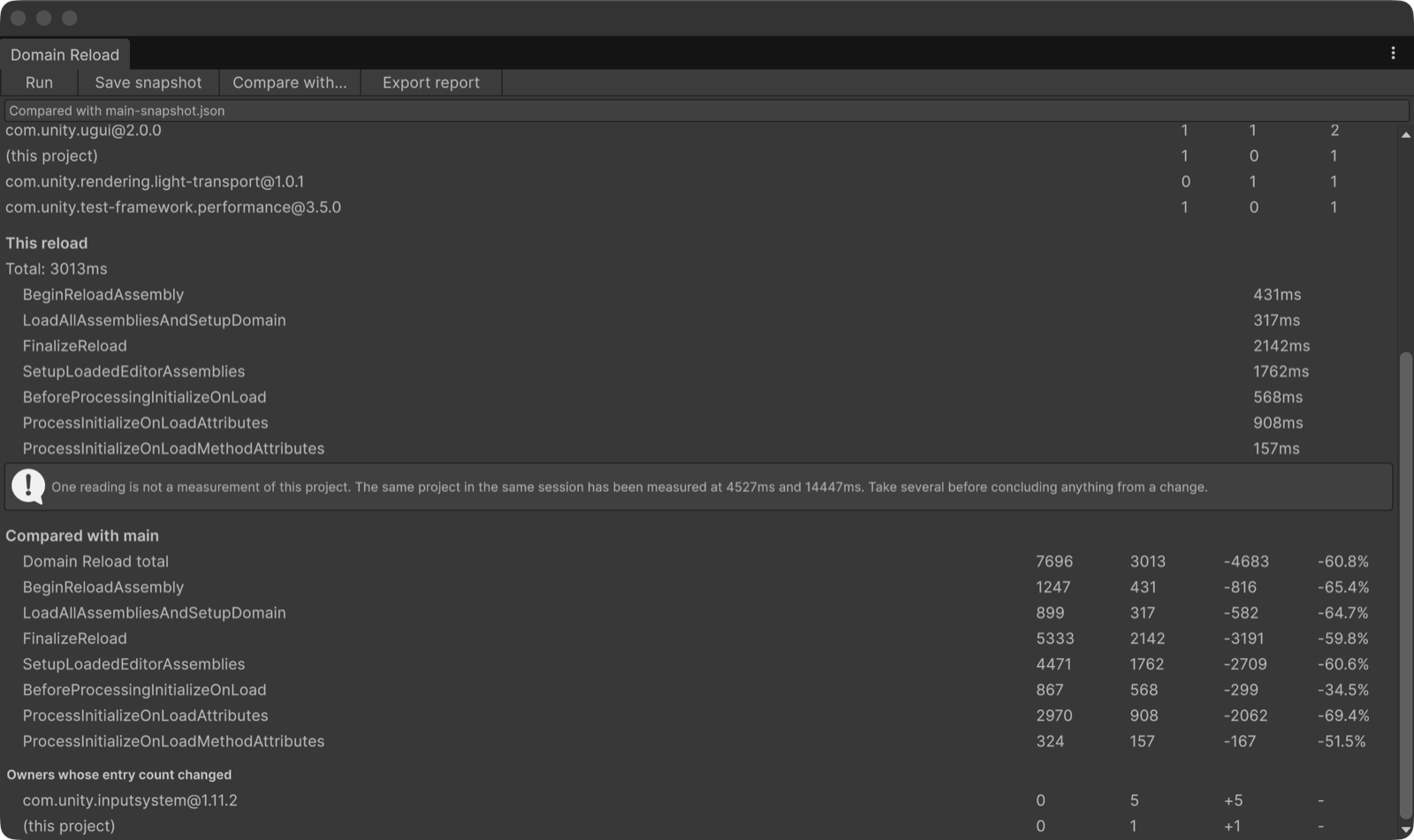
com.unity.inputsystem@1.11.2 is named with +5 entries.
The +1 under "this project" is the small script used to take these screenshots. The two reload timings come from different sessions (batch mode and an Editor window);
they are shown because the window shows them, not as a speed-up, and the window itself says one reading is not a measurement.- On a new project from Unity's default template with URP added, it listed 142 entries (88 types, 54 methods) across 21 owners, none of them from the project itself.
Unity versions
- Tested on Unity 6000.0.78f1 (Unity 6), macOS Editor: the EditMode tests (48 tests, all passing) and the runs described on this page.
- The package declares Unity 2022.3 as its minimum. It has not been tested on 2022.3. If it does not work there, the refund below applies.
- Editor-only: no runtime code, nothing is added to your builds. No dependencies.
How this was made: AI disclosure
The C# code, the EditMode tests, the documentation and this page were written with the help of a large language model,
then read, run and corrected by a person before release. No figure on this page was written by the model:
every number comes from running the tool on a real Unity project and reading its output, and every screenshot
is a capture of the tool's own window in Unity.
What you get
- A ZIP (34 KB) with the
.unitypackage(18 files: full C# source, EditMode tests, documentation, a sample reload log), the license and the changelog. - Import it with Assets > Import Package > Custom Package…. It installs under
Assets/Domain Reload Auditor/. - Updates: re-download the current version at any time from your thanks page (the link is in your email).
License
- One purchase is one licence for one person. Use it in any number of your own projects, commercial or not, modify the source for them, and run it on the build and CI machines that build them.
- Not allowed: redistributing or reselling the tool or its source, or sharing your copy with people who have not bought one.
- The full text is
LICENSE.mdin the package.
Payment and refunds
- Card payment via Stripe, one time. A license key and a download link are emailed to you and shown right after payment.
- Refund within 14 days of purchase, no reason needed, as stated in our legal notice: email hello@tech-athletes.com. After a refund the download stops working.