Claude Code on a Mac: the windows you can run it in
People search for a "Claude Code GUI for Mac" for two different reasons. Some want something other than a terminal. Others want one window that shows many sessions. This page sorts out the options. We make one of them, Agent Tile, and we say clearly which one that is.
What Anthropic itself offers
According to Anthropic's Claude Code overview, Claude Code runs in several places. All of them use the same Claude Code engine:
- Terminal — the command-line
claude. - IDE extensions — VS Code (and Cursor) and JetBrains.
- Desktop app — a standalone app for macOS and Windows. The docs describe it as a way to "review diffs visually, run multiple sessions side by side, schedule recurring tasks, and start cloud sessions". It includes Claude Code and needs a paid subscription. Details: Desktop docs.
- Web — at claude.ai/code.
If you want a Claude Code window on a Mac without a terminal, start with those.
Where Agent Tile fits
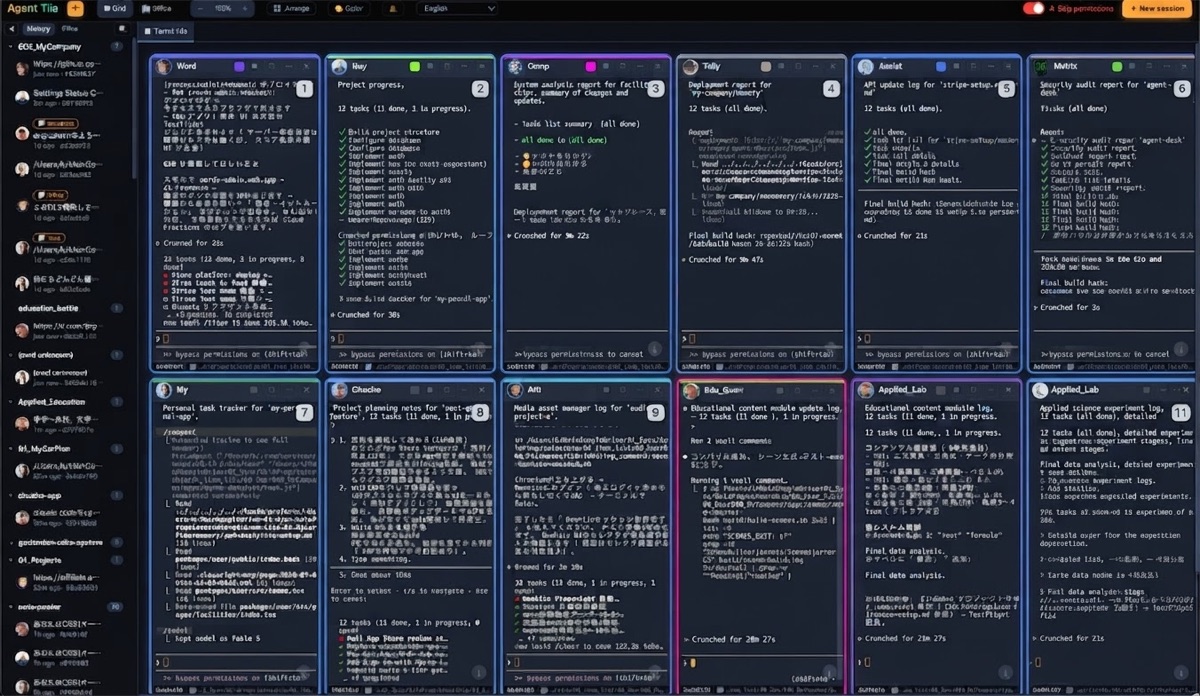
Agent Tile is not a replacement interface for Claude Code. It is a macOS window full of real terminals. Each tile runs the normal claude command line exactly as it looks in your terminal, and the tiles sit side by side on one canvas.
What it does
| Action | How |
|---|---|
| Show many sessions at once | Tiles in a grid, with no fixed limit on how many |
| Type into several sessions at once | ⌘-click tiles to select them, then type once. The selected tiles get a highlighted border |
| Look closely at one session | Double-tap ⌘ to enlarge the tile under the cursor; do it again to return to the grid |
| Move between tiles without the mouse | ⌥ + arrows or ⌥ + 1–9 |
| Group tiles | Workspace tabs, switched with ⌃1–9. Sessions in hidden tabs keep running |
| Come back after a restart | Reopen the app and each tile relaunches its session with --resume in its original folder |
| Mix agents | A tile can run Claude Code, Codex, Aider or a plain shell |
What it doesn't do
- It does not include Claude Code or an account. You install Claude Code (and any other agent) yourself.
- It does not change how Claude Code behaves. Prompts, permissions and output are those of the CLI running inside the tile.
- It does not create git worktrees. Give each tile its own folder yourself. The reason is explained in How to run several Claude Code sessions at once.
- It runs on macOS only. It is not affiliated with Anthropic.
How we use it
Agent Tile is the window we work in every day. Two examples from our own records:
- 27 tiles in 3 workspace tabs (3, 18 and 6 tiles), counted on 2026-10-21 through the app's control API. One tile coordinates the others through the bundled MCP server: it reads their output and sends each one its next instruction.
- Reopening everything at once. On 2026-10-14 we reopened every tile so it would start with a different Claude Code permission mode. Each conversation continued through
--resume, so none of the sessions started over.
Getting it
Agent Tile is sold as its full Electron source code (MIT), for a one-time $10. After you buy it, you download the ZIP and run:
unzip agent-desk-source-*.zip
cd agent-desk && npm install
npm start
You need Node.js and npm to build it.