How to run several Claude Code sessions at once on a Mac
Running more than one Claude Code session at a time comes down to two separate questions:
- Where does each session write? Two sessions editing the same checkout will step on each other.
- How do you keep an eye on all of them? A session waiting for your answer does nothing until you notice it.
Sort out the first question before the second. This page covers both, and ends with how we run our own sessions every day.
Step 1 — give each session its own checkout
Claude Code's documentation recommends git worktrees for this: each worktree is a separate checkout on its own branch. Claude Code can create one for you when it starts:
# terminal 1
claude --worktree feature-auth

# terminal 2
claude --worktree fix-login-bug
The repository needs at least one commit first. Cleanup and the other options are in Anthropic's docs: Run parallel sessions with worktrees.
You can also make the worktrees yourself and start claude inside each one:
git worktree add ../myapp-auth -b feature-auth
cd ../myapp-auth && claude
A pitfall we hit ourselves: we ran many sessions in one shared checkout. Every session in that folder uses the same .git/index. When one session ran git add and then git commit, the commit also picked up files that a different session had staged a moment earlier.
Our fix was to stop committing through the shared index. Each commit is built with a temporary index (GIT_INDEX_FILE) and git commit-tree, and contains only the paths that session names. If your sessions don't need to share one checkout, separate worktrees avoid the problem from the start.
Step 2 — decide how you want to watch them
Once each session has its own place to write, here are three common ways to run them side by side.
A. One terminal window or tab per session
This needs nothing extra: open a tab, cd into the worktree, and run claude. The terminal app you already use is enough. Terminal multiplexers such as tmux can split one window into panes in the same way.
B. Claude Code's background agents
Claude Code has its own view for monitoring parallel sessions from one screen. Anthropic documents it here: background agents / agent view. It is part of Claude Code itself.
C. A window that tiles every live session
This is what we built for ourselves: Agent Tile, a macOS app. It shows every session's real terminal side by side on one canvas.
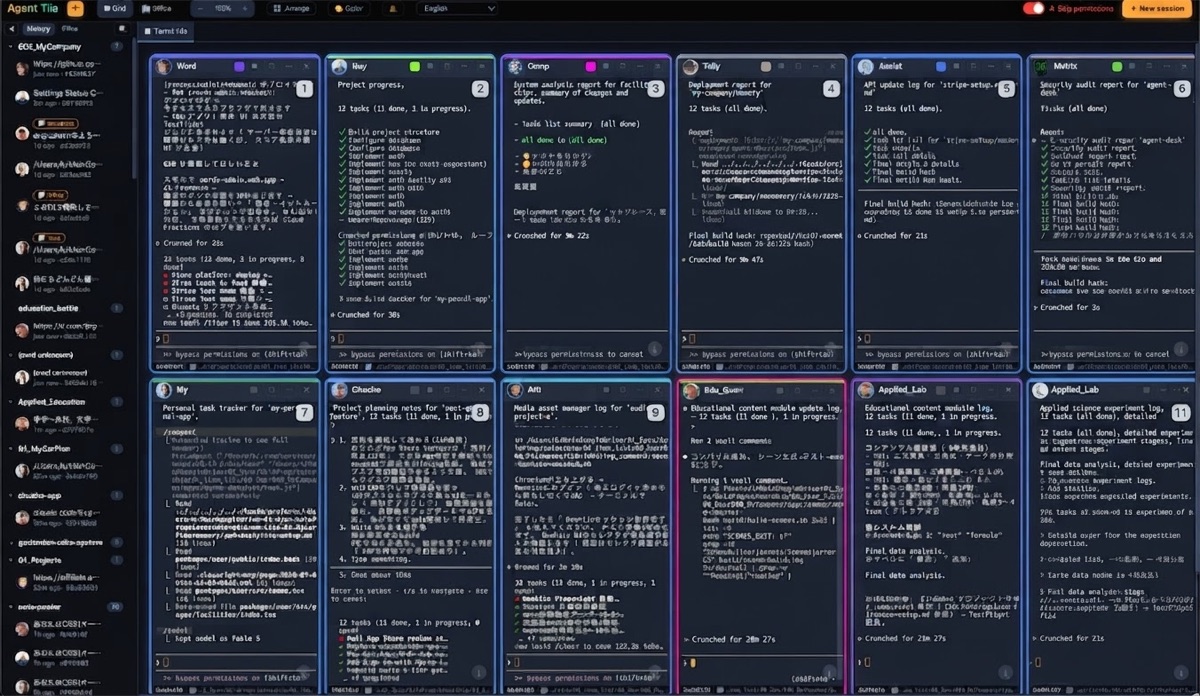
Here is what it does, and only what it does:
- Tiles any number of live terminals in a grid. Each tile can run Claude Code, Codex, Aider or a plain shell.
- ⌘-click several tiles to select them, then type once: your keystrokes go to every selected session.
- Auto-resume: close and reopen the app, and each tile relaunches its session with
--resumein its original folder. - Notifies you when a session finishes or needs input.
- Workspace tabs: split tiles across tabs and switch with ⌃1–9. Switching only changes the view, so sessions in hidden tabs keep running.
- Includes a local MCP server, so one session can list the other tiles, read their output and send them instructions.
It does not replace Step 1: Agent Tile does not create worktrees for you. Point each tile at its own folder.
How we use it in-house
We build and run our own products with these sessions every day. These numbers come from our own window on 2026-10-21, read through the app's control API:
| Workspace tab | Tiles |
|---|---|
| Admin | 3 |
| 1st | 18 |
| 2nd | 6 |
| Total | 27 |
One tile acts as a coordinator. Through the bundled MCP server it reads the other tiles' output and sends each of them its next instruction. This page was itself written in a tile that received its task that way.
We also learned the hard way where the shared-checkout problem above comes from. That is why we now say: fix where each session writes first, and only then worry about how you watch them.
Getting Agent Tile
Agent Tile is sold as its full Electron source code (MIT), for a one-time $10. You build and run it yourself with npm install && npm start. It runs on macOS. Claude Code, and any other agent you want to run in it, are installed separately.
Related: Claude Code on a Mac: a window for all your sessions